Use DatabaseName
GO
Alter Database DatabaseName Set Recovery Simple
GO
Alter Database DatabaseName Set Recovery Full
GO
DBCC SHRINKFILE ('LogFileName', 1)
GO
Showing posts with label SQL-Server. Show all posts
Showing posts with label SQL-Server. Show all posts
Thursday, September 15, 2011
Shrink SQL Server 2008 Database Log File Script
I found this script to shrink the database log file in a SQL Server 2008 database. This procedure has changed, since the BACKUP command does not work the same way as previous versions.

Monday, July 18, 2011
How to Find Tables without Indexes?
Simply run the following query in the Query Editor.
USE database_name;
GO
SELECT SCHEMA_NAME(schema_id) AS schema_name,name AS table_name
FROM sys.tables
WHERE OBJECTPROPERTY(OBJECT_ID,'IsIndexed') = 0
ORDER BY schema_name, table_name;
GO
Thursday, July 7, 2011
Server Side Paging
In the previous post I wrote about OFFSET and FETCH on SQL Denali.
Today I want to write a sample to use them in a real world:
Normally to do paging on server we do this:
which simply by changing @DesiredPageNumber, we can display data from different pages, but using OFFSET and FETCH in SQL-#Denali make it really simpler:
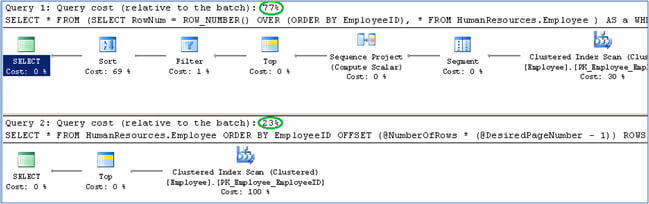
as you can see it's really simpler and makes the developer's life much easier and has better has better Performance too.

reference
Today I want to write a sample to use them in a real world:
Normally to do paging on server we do this:
USE AdventureWorks
GO
DECLARE @NumberOfRows INT = 10 -- Number of rows you want on a page
DECLARE @DesiredPageNumber INT = 5 -- Page number
SELECT *
FROM
(
SELECT RowNum = ROW_NUMBER() OVER (
ORDER BY EmployeeID), *
FROM HumanResources.Employee
) AS a
WHERE RowNum > (@NumberOfRows * (@DesiredPageNumber - 1))
AND RowNum <= (@NumberOfRows * (@DesiredPageNumber - 1)) + @NumberOfRows
ORDER BY EmployeeID
which simply by changing @DesiredPageNumber, we can display data from different pages, but using OFFSET and FETCH in SQL-#Denali make it really simpler:
USE AdventureWorks
GO
DECLARE @NumberOfRows INT = 10 -- Number of rows you want on a page
DECLARE @DesiredPageNumber INT = 5 -- Page number
SELECT *
FROM HumanResources.Employee
ORDER BY EmployeeID
OFFSET (@NumberOfRows * (@DesiredPageNumber - 1)) ROWS
FETCH NEXT @NumberOfRows ROWS ONLY;
GO
as you can see it's really simpler and makes the developer's life much easier and has better has better Performance too.
reference
Saturday, April 23, 2011
OFFSET and FETCH on SQL Server Denali
The OFFSET and FETCH clause of SQL Server Denali provides you an option to fetch only a page or a window of the results from the complete result set.
look at some samples:
USE AdventureWorks2008R2;
GO
-- Return all rows sorted by the column DepartmentID.
SELECT DepartmentID, Name, GroupName
FROM HumanResources.Department
ORDER BY DepartmentID;
-- Skip the first 5 rows from the sorted result set and return all remaining rows.
SELECT DepartmentID, Name, GroupName
FROM HumanResources.Department
ORDER BY DepartmentID OFFSET 5 ROWS;
-- Skip 0 rows and return only the first 10 rows from the sorted result set.
SELECT DepartmentID, Name, GroupName
FROM HumanResources.Department
ORDER BY DepartmentID
OFFSET 0 ROWS
FETCH NEXT 10 ROWS ONLY;
look at some samples:
USE AdventureWorks2008R2;
GO
-- Return all rows sorted by the column DepartmentID.
SELECT DepartmentID, Name, GroupName
FROM HumanResources.Department
ORDER BY DepartmentID;
-- Skip the first 5 rows from the sorted result set and return all remaining rows.
SELECT DepartmentID, Name, GroupName
FROM HumanResources.Department
ORDER BY DepartmentID OFFSET 5 ROWS;
-- Skip 0 rows and return only the first 10 rows from the sorted result set.
SELECT DepartmentID, Name, GroupName
FROM HumanResources.Department
ORDER BY DepartmentID
OFFSET 0 ROWS
FETCH NEXT 10 ROWS ONLY;
Wednesday, April 13, 2011
SQL IntelliSense
Sometime I'm creating a new table or adding a column in SQL Server 2008, but when SELECTing from it I got the red squiggly line
the reason is :There are cases where the local cache used by IntelliSense becomes stale. Refreshing the cache is easy but not necessarily obvious.
There are two ways to refresh the cache:
1) Go to Edit -> IntelliSense -> Refresh Local Cache and
2) Hit Ctrl+Shift+R
the reason is :There are cases where the local cache used by IntelliSense becomes stale. Refreshing the cache is easy but not necessarily obvious.
There are two ways to refresh the cache:
1) Go to Edit -> IntelliSense -> Refresh Local Cache and
2) Hit Ctrl+Shift+R
Tuesday, March 22, 2011
Microsoft SQL Server Migration Assistant
Sunday, March 13, 2011
SQL Server Compact 4.0
Microsoft SQL Server Compact 4.0 is a free, embedded database that software developers can use for building ASP.NET websites ,Windows desktop applications and mobile devices.
Prior to the introduction of the desktop platform, it was known as SQL Server for Windows CE and SQL Server Mobile Edition. The latest release is the SQL Server Compact 4.0 supporting .NET Framework 4.0, and dropping support for Windows Mobile in this release.
You can download it from this address and its book online from this address.
Prior to the introduction of the desktop platform, it was known as SQL Server for Windows CE and SQL Server Mobile Edition. The latest release is the SQL Server Compact 4.0 supporting .NET Framework 4.0, and dropping support for Windows Mobile in this release.
You can download it from this address and its book online from this address.
Tuesday, March 1, 2011
Tuesday, February 22, 2011
Step By Step Log-Shipping Configuration for SQL Server
it's really important to have good Disaster recovery plan.one way to prevanting a Database disaster(lose data) is using Log-Shipping, in below link you can find a good training stuffs about this great ability of SQL-Server:
link
link
Monday, February 21, 2011
Wednesday, February 16, 2011
Tuesday, February 8, 2011
Sunday, February 7, 2010
3 Layer Programming, Data-Access Tutorial
Microsoft provide a very interesting tutorial about Data-Access.
you can find them in the below link:
Data Access Tutorials
you can find them in the below link:
Data Access Tutorials
Saturday, July 4, 2009
Send SMS
many time because of the special events (like: server crash,...);we want to send sms.
I found this article on the net about this subject!
I found this article on the net about this subject!
How to send SMS messages from C# using an SQL database
Monday, March 2, 2009
How to change the SQL Server 2005 - Engin Collation
it's easy to change the database collation by using alter database but must of the time we want to change the sql-engin collation.
to do this:
to do this:
- detache all database
- copy the mdf & ldf files
- go SQL-Server CD--> setup folder
- run : setup.exe /qb INSTANCENAME=MSSQLSERVER REINSTALL=SQL_Engine REBUILDDATABASE=1 SAPWD=xxxxx SQLCOLLATION=
- attach the databases again
Subscribe to:
Posts (Atom)